


Content Menu
● Key Takeaways: How to Choose the Right 3 Prong Power Cord
● What Is a 3 Prong Power Cord? Understanding Both Connector Ends
● Are All 3 Prong Power Cords the Same? Four Compatibility Checks
● How to Choose the Right Wire Gauge, Cable Length and Amp Rating
● How to Replace a Monitor Power Cord Safely
● 3 Prong Power Cord Selection: A Practical Monitor Example
● How to Buy 3 Prong Power Cords: Retail Checklist and OEM Sourcing
● 3 Prong Power Cord Selection Checklist: Specifications to Verify
● Frequently Asked Questions About 3 Prong Power Cords● Final Thoughts: Choose a 3 Prong Power Cord by Specifications, Not Appearance
Your monitor, desktop PC, or kitchen appliance needs a new cord, and every listing on Amazon and Walmart claims to fit — yet none of them tells you the two things that matter: the connector on each end and the amps the cord can carry. The common mistake is buying by appearance. A cord that looks identical can have a different current rating or temperature class, making it unsuitable for the intended application.
This guide walks through the complete selection process: identifying both ends of a power cord, checking compatibility, understanding wire gauge and cable length, replacing a monitor power cord safely, and preparing a specification checklist for retail purchases or manufacturer RFQs.
Key Takeaways: How to Choose the Right 3 Prong Power Cord
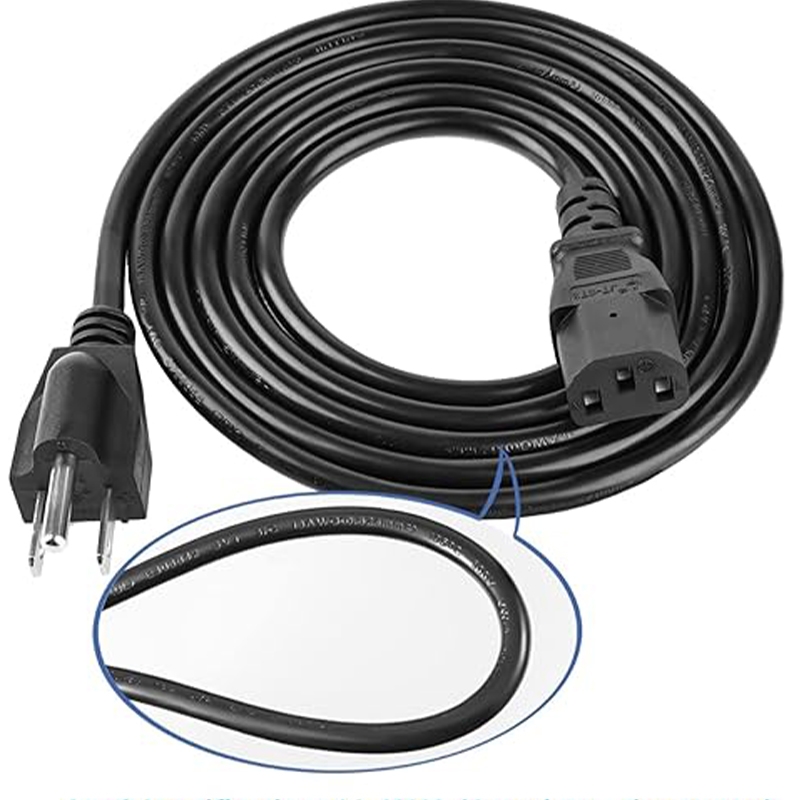
- A typical grounded 3 prong power cord has three conductors — hot, neutral, and ground — with a NEMA 5-15P wall plug on one end and a compatible grounded IEC 60320 connector, such as C13, C15, or C5, on the other.
- Not all 3 prong power cords are interchangeable. Check connector compatibility, current rating, wire gauge and length, and grounding before replacing a cord.
- Match the cord jacket marking to the device nameplate. Cable markings, connector ratings, and product approval information are more reliable than appearance.
- Replacing a monitor power cord is straightforward when the replacement meets the equipment specifications. A melted connector, damaged inlet, or repeated breaker trips requires further inspection.
- For OEM, ODM, and bulk purchases, document the plug type, device connector, current rating, wire specification, cable length, and certification requirements in your RFQ.
What Is a 3 Prong Power Cord? Understanding Both Connector Ends
A 3 prong power cord is a grounded cord set with two independently standardized ends. The wall plug follows NEMA (National Electrical Manufacturers Association) configuration naming, while the device-side connector follows the IEC 60320 (International Electrotechnical Commission) appliance coupler system.
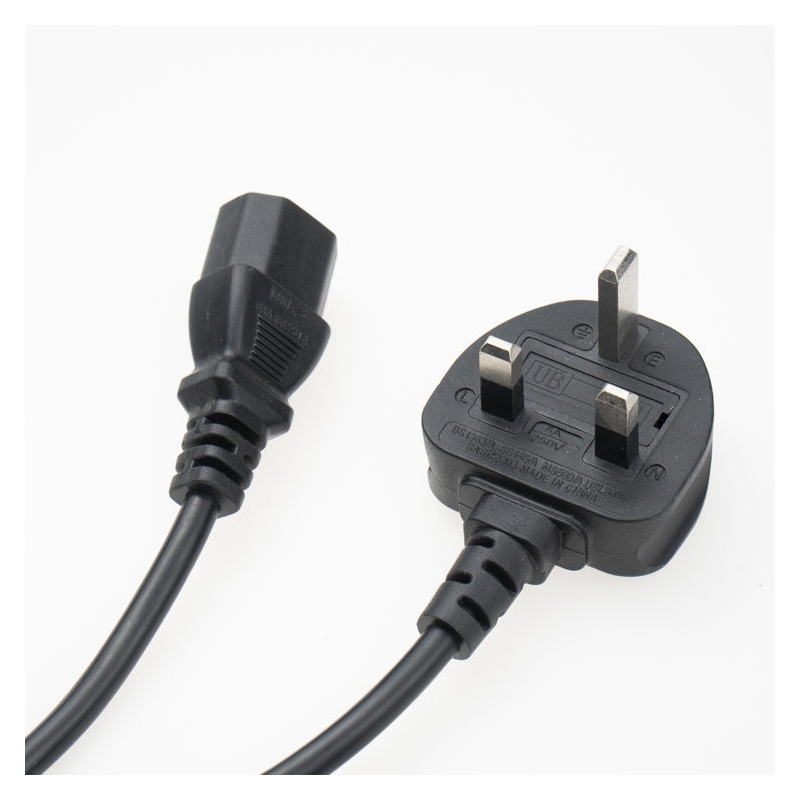
Understanding both connector names is the first step in selecting a compatible power cord. A typical North American configuration is NEMA 5-15P to C13, commonly used for desktop computers and monitors.
NEMA 5-15P: Identifying the North American Wall Plug
NEMA 5-15P is the grounded three-prong plug commonly used on North American household and office equipment.
The name identifies its configuration:
- 5: Grounded 125 V configuration.
- 15: 15 A rating.
- P: Plug, as opposed to a receptacle, which uses the letter R.

The rounded third prong is the grounding pin. It provides a protective grounding path between the equipment chassis and the building grounding system, helping protective devices operate when an electrical fault occurs.
In North American wiring practice, black is typically hot, white is neutral, and green is ground. The correct terminal connections and applicable wiring requirements must be followed when assembling a plug. This work should be performed by qualified personnel.
If a device requires more current than the cord assembly is rated to carry, a NEMA 5-15P cord is not an appropriate solution. The circuit and equipment requirements must be evaluated rather than simply choosing a different-looking cord.
IEC 60320 Connectors: C13, C15, C5 and C7 Differences
The device-side connector is standardized by IEC 60320. Different connector types are designed for different equipment configurations, current ratings, and temperature requirements.
The following connectors are commonly encountered in power cord applications:
| Connector | Typical rated current | Maximum pin temperature | Grounded | Typical equipment |
|---|---|---|---|---|
| C13 | 10 A | 70°C | Yes | Desktop PCs, monitors, printers, TVs |
| C15 | 10 A | 120°C | Yes | Kettles and certain hot appliances |
| C5 | 2.5 A | 70°C | Yes | Laptop power adapters |
| C7 | 2.5 A | 70°C | No | Small radios and some older TVs |
*Note: Ratings are typical IEC connector ratings. Always check the applicable standard, product marking, and complete cord-set specification.*
An important distinction is that C7 is a two-conductor, ungrounded connector. It should not be classified as a three-prong grounded connector.
C15 answers a common question: what is the 3 prong power cord used on certain kettles called? It is typically a C15 connector. It looks similar to C13 but has a notch above the ground contact area.
This notch is a mechanical keying feature. A C13 connector cannot mate with a C16 appliance inlet, while a C15 connector is designed for C16 inlets and can also mate with compatible C14 inlets.
For equipment requiring higher current ratings, the C19/C20 connector family is commonly used. This is a different connector family and is covered in our high-amp C19 power cords guide.

Three Conductors in a 3 Prong Power Cord: Hot, Neutral and Ground
Inside the cable jacket, a typical North American 3 prong power cord contains three conductors:
- Black: Hot conductor.
- White: Neutral conductor.
- Green: Ground conductor.
These are common North American flexible-cord color conventions. The ground conductor provides a protective path for fault current.
Imported cords manufactured to IEC harmonized wiring color conventions commonly use:
- Brown: Live.
- Blue: Neutral.
- Green/yellow: Protective earth.
The functions are equivalent, but the color systems should not be confused when inspecting or terminating a cord.
With both ends identified, you can state a complete cord specification. For example: NEMA 5-15P to C13, three conductors, grounded, with the required voltage and current ratings.
Are All 3 Prong Power Cords the Same? Four Compatibility Checks
No. Three-prong power cords are not automatically interchangeable. Two cords can have the same NEMA 5-15P wall plug but differ in current capacity, conductor gauge, connector type, or temperature rating.
Before replacing a cord, complete the following four checks in order.
1: Check Plug and Connector Compatibility
Both ends must match the intended wall receptacle and equipment inlet.
Check the connector configuration, pin arrangement, and mechanical keying. Never force a connector into an inlet that does not match its design.
For example, a C13 connector cannot fit a C16 appliance inlet because of the keying feature. A compatible C15 connector is required for that configuration.
2: Compare the Cord's Current Rating with the Device Nameplate
The complete power cord assembly must be rated for the equipment's electrical requirements.
A cord rated for 10 A should not be used with equipment requiring more than 10 A, even if the wall plug itself has a 15 A rating.
The lowest-rated component and applicable product approval requirements determine the permissible rating of the complete assembly.
3: Match Wire Gauge and Cable Length to the Application
Conductor gauge and cable length affect resistance, voltage drop, and heat generation.
Thinner conductors have higher resistance, while longer cables increase total conductor resistance. Both factors must be considered when selecting a cord for the intended load.
Always use the manufacturer's rated specifications for the complete cord assembly rather than relying on AWG alone.
4: Verify Grounding and Cord Condition
A grounded device requires an appropriate grounded cord configuration.
Check that all required conductors are present, the grounding pin is intact, and the cable and connectors show no signs of damage.
Do not substitute an ungrounded two-conductor cord for equipment designed to use a protective ground connection.
Common 3 Prong Power Cord Compatibility Mistakes
Three practical examples illustrate why connector appearance alone is not enough.
Example 1: Using a C15 Cord on a Computer
A C15 connector may fit a compatible C14 computer inlet. If its electrical ratings and other specifications meet the computer requirements, it can be used. However, the higher temperature capability is generally unnecessary for a typical computer.
Example 2: Using a C13 Cord on a Hot Appliance
A C13 connector cannot mate with a C16 inlet. The C15 connector is designed for that hot-condition appliance interface.
Example 3: Choosing an Underrated Cord
A cord with an unsuitable conductor size or current rating may overheat under sustained load. The problem may not be immediately visible, which is why checking the complete cord-set rating is essential.
If you cannot verify the cord's rating from its jacket marking or manufacturer documentation, do not guess.
How to Choose the Right Wire Gauge, Cable Length and Amp Rating
Three important details printed on a power cord jacket are conductor gauge, conductor count, and insulation or temperature classification.
These specifications help buyers understand whether a cord is suitable for a particular application.
Understanding SJT, SVT and Other Power Cord Jacket Markings
Read the legend printed along the cable jacket to identify its construction and specifications.
For example, a marking such as "SJT 18/3 105°C VW-1" can be interpreted as follows:
- SJT: Service Junior Thermoplastic cord construction.
- 18/3: 18 AWG conductors, with three conductors in total.
- 105°C: Insulation temperature rating.
- VW-1: A flame test designation associated with the cable construction.
SVT identifies another type of thermoplastic flexible cord construction commonly used in lighter-duty applications.
Retail listings may describe monitor replacement cords as 18/3 SVT or 16/3 SJT. However, the complete cable and cord assembly ratings must always be checked.
A cord with missing or illegible markings should not be assumed to have a particular current rating.
Matching AWG Wire Gauge to Electrical Current Requirements
AWG (American Wire Gauge) runs inversely: the smaller the number, the thicker the conductor.
A thicker conductor generally has lower electrical resistance and can support higher current under comparable conditions.
However, there is no single universal table that determines the allowable current of every finished power cord based only on AWG.
The rating of a complete cord assembly depends on:
- Conductor material and construction.
- Cable insulation and jacket type.
- Temperature classification.
- Connector and terminal ratings.
- Applicable safety standards and product approvals.
For example, commercially available 18/3 SVT and 16/3 SJT monitor cords may carry different ratings depending on their construction and approvals. Buyers should check the manufacturer's stated voltage and current ratings rather than assume all cords with the same AWG are identical.
Why Power Cord Length Affects Voltage Drop and Heat
Cable length affects electrical resistance and voltage drop.
As cable length increases, conductor resistance also increases. Under the same current, this can result in greater voltage drop and additional heat generation.
For a typical desktop setup, choose a cable long enough to reach the outlet comfortably without leaving excessive unused cable.
For equipment located farther from the power source, a suitable conductor size and a properly rated cord assembly are more important than simply purchasing the longest available cable.
Avoid tightly coiling excess cable during operation, especially under significant electrical loads.
How to Replace a Monitor Power Cord Safely
Monitor power cord replacement is usually straightforward when the equipment uses a standard detachable connector and the replacement cord meets all applicable specifications.
A common three-prong monitor power cord configuration is NEMA 5-15P to C13, but not every monitor uses this arrangement.
Four Steps to Replace a Monitor or Desktop Computer Power Cord
Follow these steps when replacing a detachable power cord:
1. Switch off and disconnect the equipment. Remove the old cord by holding its connector body rather than pulling on the cable jacket.
2. Check the device nameplate. Identify the required input voltage, current, and frequency.
3. Verify the replacement cord. Confirm connector compatibility, current rating, wire specifications, cable length, and grounding.
4. Connect and inspect. Fully seat the replacement connector and check that it fits securely without looseness or visible damage.
For example, a monitor rated at 1.5 A may use a suitable 10 A / 125 V-class cord, provided the complete assembly meets the equipment requirements.
How to Read a Monitor or Computer Power Supply Nameplate
The device nameplate is the primary reference for determining its electrical input requirements.
It is commonly located near the power inlet, on the underside of the monitor, or on the power adapter.
Pay attention to three details:
- Input voltage: For example, 100–240 V.
- Input current: The rated current in amperes.
- Frequency: For example, 50/60 Hz.
Many modern monitors support a wide input voltage range, but the replacement cord must still be suitable for the local supply and device configuration.
If the nameplate is missing or unreadable, consult the manufacturer's documentation. Do not select a replacement based solely on the old cord's appearance.
When Replacing the Power Cord Is Not Enough
Some symptoms indicate that the problem may involve the equipment inlet or electrical circuit rather than the cord itself.
Stop using the equipment and arrange professional inspection if you notice:
- A melted or discolored connector face.
- A loose, cracked, or damaged equipment inlet.
- A power cord that becomes unusually warm during normal operation.
- Repeated circuit breaker trips.
- Exposed conductors or damaged insulation.
A damaged cable should be replaced rather than covered with temporary repairs. If the inlet or electrical circuit is damaged, replacing the cord alone will not solve the underlying problem.
This guide covers power cord selection and replacement only. It does not replace the judgment of a qualified electrician or equipment technician.
3 Prong Power Cord Selection: A Practical Monitor Example
A practical example makes the selection process easier to understand.
Suppose you have a 27-inch office monitor with a C14 inlet on the back. Its nameplate reads:
"100–240 V, 1.5 A, 50/60 Hz"
The original cord was lost during an office move. Here is how to select a replacement.
Step 1: Identify the Required Plug and Connector
The monitor has a C14 equipment inlet, so it requires a compatible C13 cord connector on the device end.
For a typical North American office outlet, the wall end would be a NEMA 5-15P plug.
The required configuration is NEMA 5-15P to C13.
Step 2: Check the Current Rating
The monitor's nameplate specifies an input current of 1.5 A.
A complete cord assembly rated at 10 A / 125 V is sufficient for this application, assuming all other electrical and approval requirements are met.
Step 3: Select the Appropriate Wire Gauge and Length
If the monitor is located approximately 4 feet from the outlet, a 6-foot cord provides sufficient reach and some installation flexibility.
An 18 AWG conductor is commonly used in suitable low-current monitor cord assemblies, but the final selection must follow the manufacturer's rated specifications.
Step 4: Verify Grounding Requirements
The monitor's electrical design determines whether protective grounding is required.
If the equipment requires a grounded connection, select a three-conductor cord with an intact grounding path. Do not replace it with a two-conductor C7 cord.
Result: A suitable NEMA 5-15P to C13, 18/3 SVT, 6-foot cord assembly rated for the monitor's electrical requirements is a common replacement configuration.
Now consider a different application: a 1,500 W space heater operating at 120 V.
Its calculated current is:
1,500 W ÷ 120 V = 12.5 A
This exceeds the 10 A rating of a typical C13 connector assembly. A monitor cord should therefore not be used for this application.
The replacement must be a manufacturer-approved cord configuration rated for the heater's load and intended operating conditions.
The lesson is simple: the connector shape alone never determines whether a power cord is suitable.
How to Buy 3 Prong Power Cords: Retail Checklist and OEM Sourcing
Your purchasing approach depends on the quantity and customization requirements.
For a single replacement, the priority is matching a suitable stocked product to the device specifications. For OEM, ODM, and bulk purchases, the priority is providing the manufacturer with a complete technical specification.
Six-Point Checklist for Buying a 3 Prong Power Cord
Before purchasing a replacement cord, verify the following six items:
1. Plug end: NEMA 5-15P or the correct wall plug configuration for your market.
2. Device connector: C13, C15, C5, or another connector that matches the equipment inlet.
3. Current rating: The complete cord assembly must meet or exceed the equipment's requirements.
4. Wire gauge and jacket: Confirm AWG, conductor count, jacket type, and temperature classification.
5. Cable length: Measure the actual distance and allow sufficient installation slack.
6. Certification and markings: Check applicable safety approval marks and legible cable markings.
Listings that do not clearly identify the cord rating or specifications should be treated with caution.
For businesses sourcing power cords for the North American market, our US power cords range covers standard NEMA configurations and related cord-set options.
OEM, ODM and Bulk 3 Prong Power Cord Orders: What to Include in an RFQ
For bulk purchases, a clear RFQ (Request for Quotation) helps manufacturers understand the exact product requirements and prepare an accurate quotation.
In addition to the six basic specification items, buyers should provide:
- Required cable length and length tolerance.
- Cable type and temperature classification.
- Plug and connector model requirements.
- Destination market and applicable certification requirements.
- Packaging, labeling, and private-label requirements.
- Estimated order quantity and expected purchasing frequency.
Before bulk production, request samples to check connector fit, cable markings, terminal assembly quality, and overall workmanship.
A datasheet confirms the specifications on paper, while a physical sample allows buyers to evaluate the actual product against their equipment and requirements.
For IEC 60320 connector families and custom cord-set options, visit our IEC 60320 power cords page.
3 Prong Power Cord Selection Checklist: Specifications to Verify
The following checklist can be copied into a purchase request, RFQ, or supplier communication.
| No. | Item | What to specify or verify |
|---|---|---|
| 1 | Plug end | NEMA 5-15P or the required wall configuration |
| 2 | Device end | C13, C15, C5, or another compatible connector |
| 3 | Current rating | Complete assembly rating suitable for the device |
| 4 | Wire and jacket | AWG, conductor count, cable type, and temperature class |
| 5 | Cable length | Measured installation distance plus sufficient slack |
| 6 | Certification | Applicable safety approvals and legible cable markings |
A specification sheet that covers all six items gives the manufacturer a clearer basis for quotation and sample preparation. Missing specifications can lead to unnecessary clarification and incorrect product selection.
Frequently Asked Questions About 3 Prong Power Cords
Can I Use a 3 Prong Power Cord on a 2 Prong Device?
It depends on the equipment's inlet design and electrical requirements.
A device with a two-slot inlet is designed for its corresponding two-conductor connection. A three-prong cord should not be forced into an incompatible inlet or adapted without confirming the equipment manufacturer's requirements.
Likewise, never remove or bypass the grounding connection on equipment designed to use protective earth.
Does a Thicker Power Cord (Lower AWG Number) Always Mean Better Performance?
No. A lower AWG number generally means a thicker conductor with lower resistance, but a larger conductor is not automatically necessary for every application.
For a monitor drawing 1.5 A, a suitably rated 18 AWG cord assembly may be adequate. A much thicker cable could add unnecessary cost and stiffness.
The correct selection depends on the equipment's electrical requirements and the complete cord assembly rating.
How Can I Tell the Difference Between C13 and C15 Connectors?
Look at the top edge of the connector.
A C15 connector has a notch above the ground contact area, while a C13 connector has a flat edge.
The notch allows C15 to mate with a C16 inlet, whereas C13 is mechanically blocked from that inlet. C15 can also mate with compatible C14 inlets.
Can I Order Custom NEMA 5-15P to C13 Power Cords in Different Lengths?
Yes, custom cord-set requirements can include different cable lengths, wire specifications, jacket types, connector configurations, and packaging options, subject to manufacturing capability and applicable certification requirements.
For an accurate quotation, provide the plug type, connector type, cable specifications, target length, destination market, and estimated order quantity.
What Information Should I Provide for a Bulk Power Cord Quotation?
For a bulk quotation, provide:
- Plug and connector configuration.
- Rated voltage and current.
- Wire gauge and conductor count.
- Cable type and temperature requirements.
- Cable length and tolerance.
- Destination market and certification requirements.
- Estimated order quantity and packaging requirements.
Providing these details helps reduce quotation delays and makes sample evaluation more efficient.
When Should a Power Cord Be Replaced Instead of Repaired?
Replace a power cord if it has a cracked or melted jacket, exposed conductors, a loose molded plug, or discoloration at either end.
Do not use temporary repairs to return a damaged cord to service. Flexible-cord repairs and retermination should only be handled by qualified personnel using suitable components and procedures.
Final Thoughts: Choose a 3 Prong Power Cord by Specifications, Not Appearance
Choosing the right 3 prong power cord comes down to six verifiable details: connector type, device compatibility, current rating, wire gauge, cable length, and certification requirements.
For many North American desktop computers and monitors, a NEMA 5-15P to C13 cord is a common configuration. However, the correct replacement must always match the equipment nameplate and the complete cord assembly specifications.
For OEM, ODM, and bulk buyers, documenting these requirements before requesting a quotation helps reduce compatibility issues and unnecessary production delays.
Whether you need a standard replacement cord or a custom power cord solution, start with the specifications rather than appearance.



 Email
